Call Us Now
For Product Enquiry
Opening Hours
“The right office equipment turns everyday tasks into efficient workflows.”
Every office has different document management requirements, and selecting the right photocopier can make routine tasks more efficient. From preparing business reports and printing invoices to copying contracts and scanning important records, a reliable machine helps employees manage their workload with greater convenience. Choosing equipment that suits your office environment can also improve productivity and minimise unnecessary interruptions.
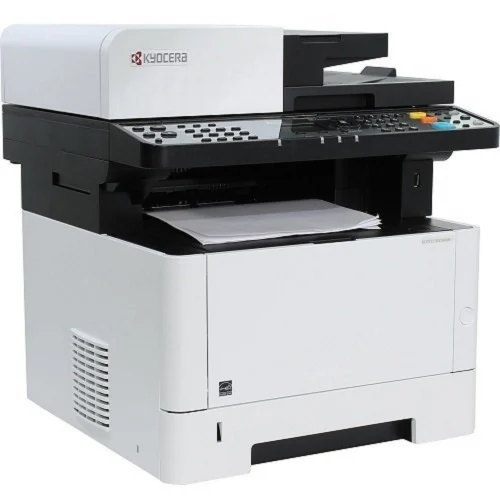
Before making a purchase, businesses should evaluate machine performance, printing capacity, multifunction features, maintenance requirements, and long-term operating expenses. Those exploring Kyocera Photocopier Dealers in Chennai can benefit from understanding these factors to identify a suitable model for their workplace. In this blog, we explore eight essential things to know before investing in a Kyocera photocopier, helping you make a practical choice that supports your business needs.
To choose an appropriate photocopier, you need to know your office’s normal printing requirements. A small office that prints occasional invoices may need a different machine than a corporate department that prints reports, agreements and lots of documents. Performance and use frequency evaluations of the equipment can help define the capacity and performance needed.
There are many different combinations of speed, function and paper capacity that are necessary for different offices. Businesses can research the Kyoceras photocopier models to learn about the features and determine which equipment would work best for their business. They can range from small office printers to multifunction devices and higher capacity devices that are suitable for heavy workloads.
Time is a critical factor in offices where people often require hard copies of their documents. When using an equipment that is slow, there are delaying results during the busy period, particularly in the case of multiple departments using the same photocopier. When choosing a machine, it is important to make sure that it has the appropriate performance specifications to ensure that the workload is not unduly delayed by waiting for printed materials to be finished.
Clear text, consistent output and reliable paper handling are essential for professional documents. If businesses regularly need to create proposals for customers, financial reports, contracts and internal documents they should make sure that their photocopier can handle the print quality. Paper handling is also crucial as the machine would have to be capable of handling the sizes and kinds of paper utilized on a day-to-day basis.
Also Read This: 7 Steps to Choose Epson Printer Dealers for Your Business
In today’s work environment, you may require more than just a copying machine. Staff members need to print out work from computers, scan documents, share scanned documents and handle documents in various departments. Businesses can effectively organize its office equipment with a multifunction photocopier that combines a number of activities in one device.
The cost of your photocopier isn’t just the initial buy. The ongoing costs of businesses such as consumables, replacement parts, servicing, electricity, etc., must also be taken into consideration. Knowing what these costs can be before making a decision can help to set a realistic budget and avoid unforeseen costs after installation.
Even if a photocopier is purchased, it will need technical support, routine maintenance or replacement parts over its useful life. This level of after-sales support can go a long way in ensuring that businesses solve their hardware issues and minimize interruptions caused by equipment failures. It’s especially convenient for offices that need to print constantly as they can get help whenever they want.
Choosing the right photocopier is just one aspect of the buying process. You can also be affected by the supplier you select, such as product selection, installation support, coordinating the product warranties and access to maintenance services. Speaking to an informed agent makes it easier to know the models that are available and choose equipment for your workplace.
Investing in a Kyocera photocopier requires careful consideration of printing requirements, machine specifications, paper handling, multifunction features, and long-term expenses. Evaluating these factors helps businesses choose equipment that supports their daily activities without unnecessary costs or operational limitations.
Before making a final decision, compare suitable models, review warranty conditions, and request detailed quotations from potential suppliers. Businesses exploring Kyocera photocopier dealers in Chennai should also consider the availability of technical assistance and consumables alongside the machine’s features and price. A well-informed choice can help create a more productive office environment and support reliable document management as business requirements evolve.
Consider your daily printing volume, required features, printing speed, paper capacity, maintenance expenses, and warranty coverage before choosing a suitable Kyocera photocopier.
Yes, depending on the model. Kyocera offers printing solutions with different capacities and features, allowing small offices to select equipment that matches their document management needs.
You can manage operating costs by choosing a machine suited to your workload, using compatible genuine consumables, enabling duplex printing, and following the recommended maintenance schedule.
Look for printing, copying, scanning, automatic document feeding, network connectivity, and duplex printing based on your office requirements and the selected model’s specifications.
Compare product availability, pricing transparency, installation assistance, warranty conditions, genuine consumables, and after-sales support before selecting a dealer.
Looking for top-notch Printer, Photocopier Dealers in Chennai? Well, we are one of the best Photocopier Dealers in Chennai, Printer Dealers in Chennai. At Vijay Imaging, we bring businesses closer to world-class printing solutions by offering genuine products like Canon Photocopier, HP Printer, Epson Printer, Kyocera Photocopier, Konica Minolta Printer, Brother Printer, Evolis Card Printer, ID Card Printer in Chennai.
No: 160/2, Poonamallee Salai, Kolapakkam, Porur, Chennai, Tamil Nadu, India – 600128
© 2026 Vijay Imaging Products. All Rights Reserved. | Chennai, Tamil Nadu Designed & Developed By